
 League of Legends
 FortniteBeta
 CS2Beta
 DeadlockBeta

TCG Machine for League of Legends
A League clip maker that finds the kills for you
Every kill and assist on your scoreboard opens a clip. You pick the ones that post.
TCG Machine is a Windows app that reads the kill and assist counter on your League of Legends scoreboard, opens a clip every time it goes up, and turns those moments into vertical Shorts with titles, descriptions and thumbnails. You review and approve every clip before anything goes out. It's in free beta now, and you can join the beta to get a key and the download.
I built it for my own channel, because the clips were sitting in my recordings the whole time. Finding one good fight in a 2 hour stream can take longer than the fight did. That's the job TCG Machine takes off you.
How it decides what's a clip
It reads the scoreboard, not the volume. League shows your personal kills, deaths and assists as a K/D/A counter next to the game clock. TCG Machine watches that counter through your recording, and every time your kills or assists go up, it opens a clip. Deaths never open one.
- Fights stay in one piece. Kills and assists that land close together share one clip. A double, a penta or a skirmish with assists is one card, so you can end up with fewer clips than kills and assists.
- No loudness or score gate. Nothing is dropped because it was quiet or because a score was low. You approve or skip each clip in review.
- It checks itself. When the game ends, it compares what it found with your final scoreboard. If it looks short, you'll see a warning that the scoreboard may be incomplete, and a Rescan scoreboard button.
- It isn't tied to one champion. It reads your counter, so it works for whatever you're playing.
Your voice and your audio aren't used for picking clips. They are for spoken captions, which are not in the first beta.
What you need
- Windows 10 or 11, 64-bit. No graphics card required.
- Any raw MKV or MP4 recording, from OBS, Streamlabs or any software that saves those files. Any resolution works.
- Your scoreboard counter visible in the recording, in its normal spot at the top of the screen. A camera or overlay sitting on top of it breaks kill detection, and the app warns you when your layout does that.
- An internet connection for titles and descriptions. Setup works offline.
Not sure how to record it? The guide on the best OBS recording settings for League covers it, and what you need has the full list.
What TCG Machine does with your League recording
-
01
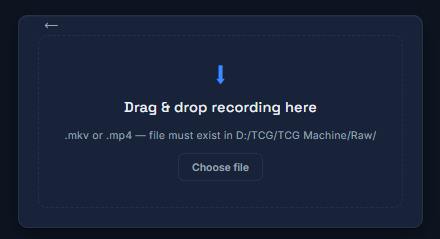
Drop in your League recording.
TCG Machine reads the K/D/A counter on your scoreboard. Every kill or assist opens a clip, deaths never do, and a skirmish stays in one clip.
 Opens full size in a new tab.
-
02
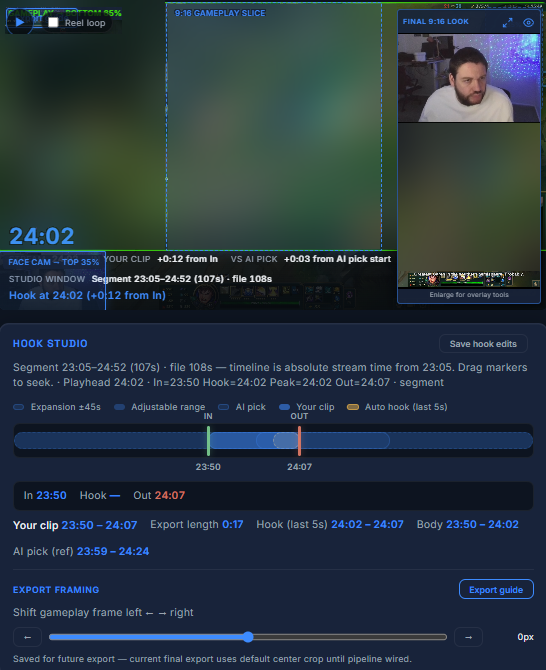
Cut it tight. Land the hook.
Each moment opens in Hook Studio. Set where the clip starts, where it ends and where the hook lands, then approve it or skip it.
 Opens full size in a new tab.
-
03
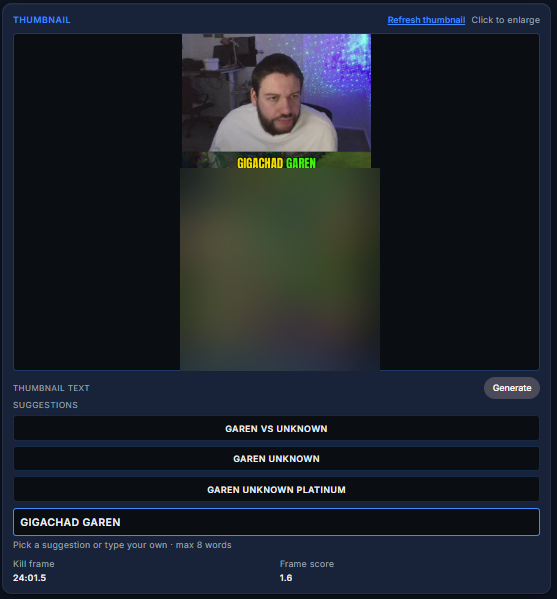
Thumbnail text and a title, drafted for you.
Pick a thumbnail line or type your own. The title and description are already written, so you edit words instead of starting from nothing.
 Opens full size in a new tab.
-
04
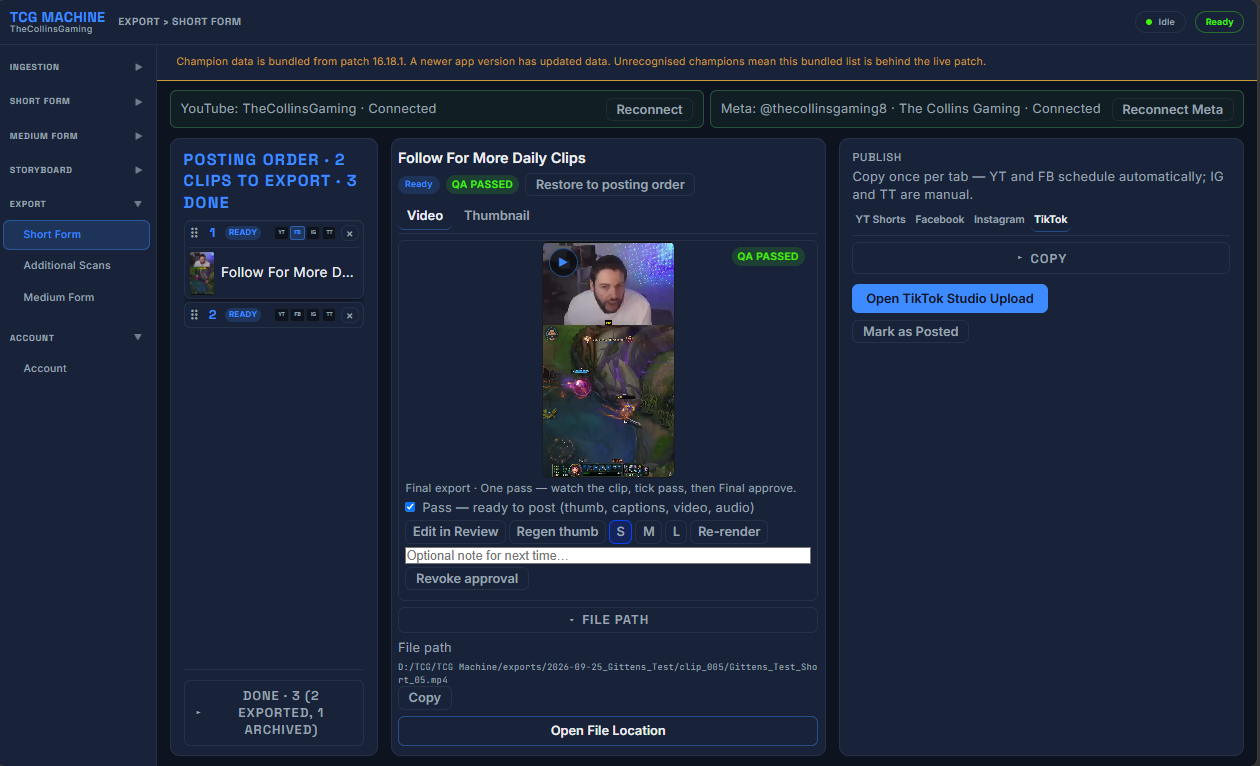
Schedule it or post it.
YouTube can be scheduled from the app. Facebook and Instagram open Meta Business Suite. TikTok is a manual upload.
 Opens full size in a new tab.
What it did for TheCollinsGaming
TheCollinsGaming built TCG Machine for their own League of Legends channel and went from 1 to 2 posts a week to 2 posts per day, every day since July 15 2026.
That is their result, on League. It is not a promise for your channel.
How to post League clips
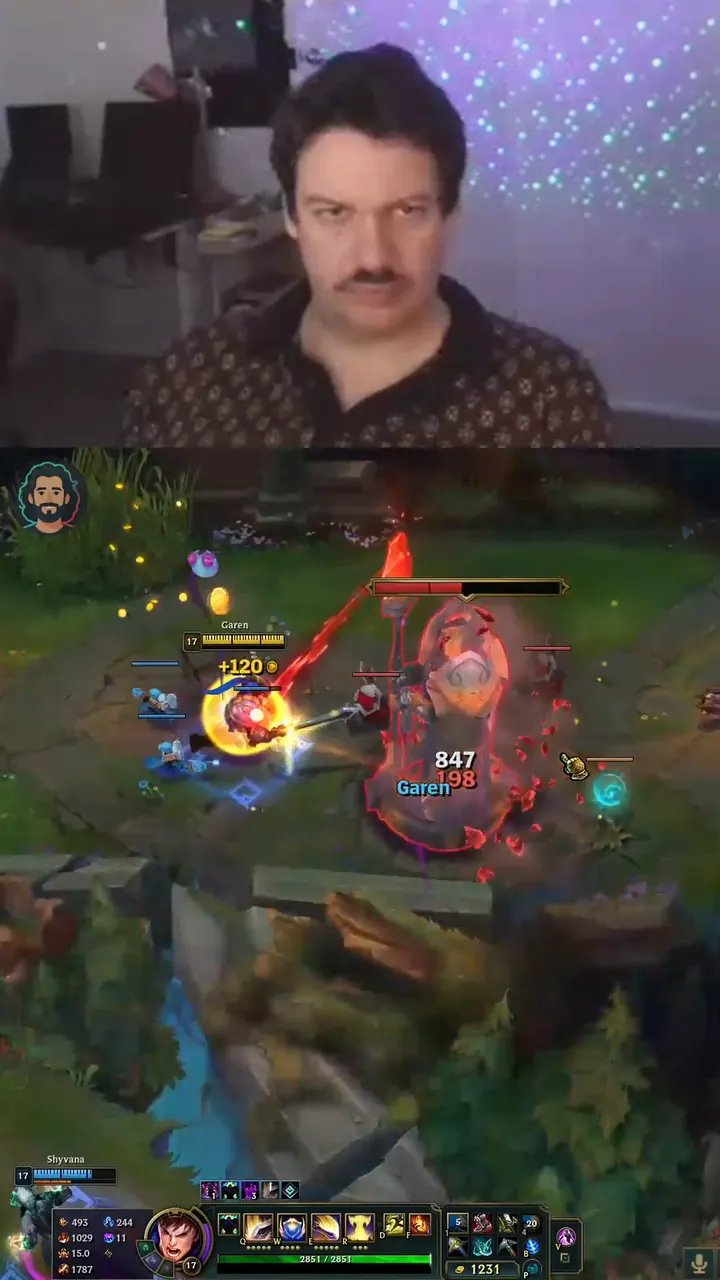
The short version: one fight, one clip, and the fight starts in the first second. League clips work when a viewer who doesn't know the game state can still see who wins.
What to clip
- Outplays. A flash dodge, a turn in a 1v2, a kill under their tower that you walk out of.
- Skirmishes you swing. The fight where your engage, your ult or your peel decides it. TCG Machine already keeps a skirmish in one clip, so you don't stitch it together.
- Steals and objective fights. A smite steal or a baron fight you take kills in. Kills open the clip, so check the start covers the setup.
- The funny ones. A misplay you laugh at is worth posting. Your reaction is the hook.
Hooks that work for League
Name the matchup or the moment, not the champion's lore. "Garen vs Darius, level 3, he flashed first" tells a League player why to stay. The thumbnail line does the same job in five words or less. There's a whole guide on how to write a hook.
Length
Keep it as long as the fight and no longer. YouTube counts square and vertical videos up to three minutes as Shorts, and Instagram won't recommend Reels over three minutes to new people, so a single fight fits with room to spare.
The frame
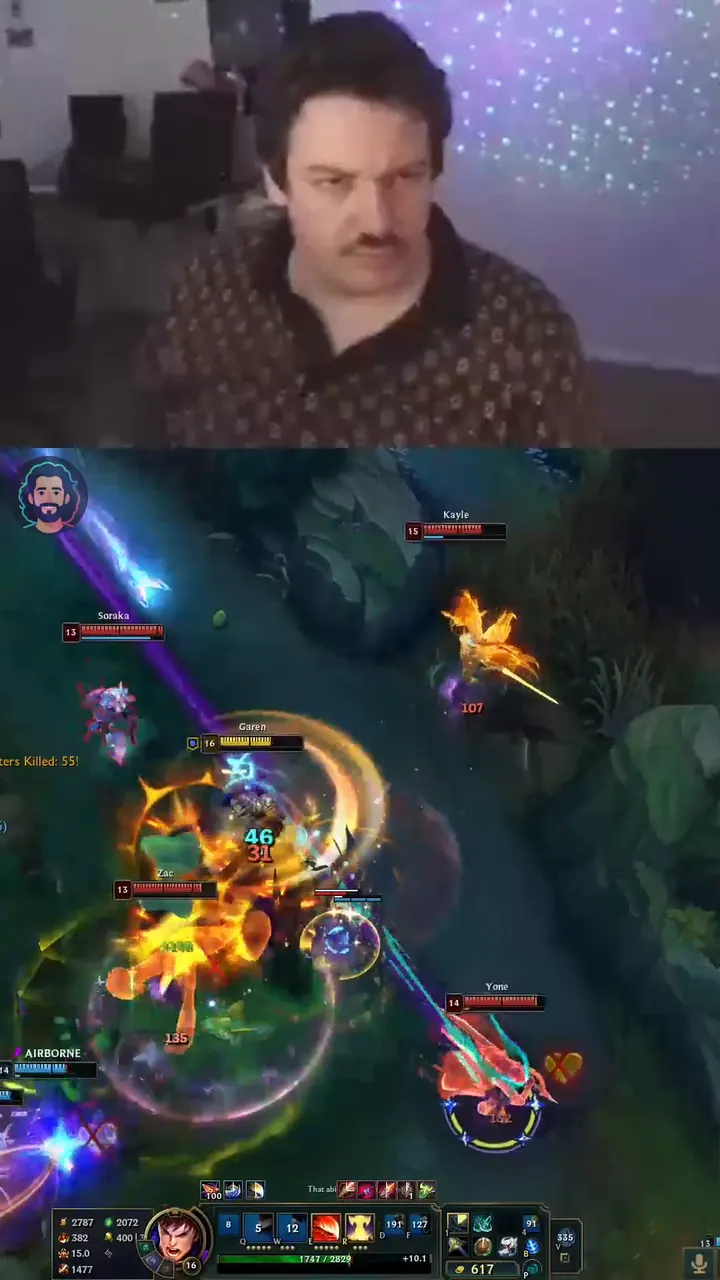
Your camera on top and the fight below is the layout that works on a phone. TCG Machine builds it from where your webcam sits in the recording, 35% camera and 65% gameplay, and you can slide the gameplay left or right to catch the action. No camera? You get the full frame on a blurred background instead.
Where League clips do best
Post the same clip to YouTube Shorts, TikTok, Instagram Reels and Facebook, then watch which one your audience lives on. TCG Machine schedules YouTube from the app and opens Meta Business Suite for Facebook and Instagram. TikTok is a manual upload.
Sources, checked 17 November 2026: YouTube Help, three minute Shorts and Instagram, Reels.
Hashtags for League
Copy a set, paste it under your caption, and swap one tag for your own channel tag. Why four, and what each platform does with them, is in the guide to titles, descriptions and hashtags.
YouTube Shorts
#LeagueOfLegends #LoL #LeagueClips #Gaming
TikTok
#leagueoflegends #lol #leagueclips #gamingclips
Instagram and Facebook Reels
#leagueoflegends #lol #gamingclips #gamer
Tips and tricks for League creators
Open on the action
Start the clip a beat before the engage, not at the walk to lane. Hook Studio lets you move the start until the first second already shows the fight.
Clip every multi kill
A double or better is the easiest clip in League to watch without context. TCG Machine groups the kills into one clip for you.
Cut the recall and the death timer
If the clip runs on after the fight into a recall or a grey screen, trim the end. A clip that ends on the kill gets watched to the end.
Keep the scoreboard clear
Your K/D/A counter is how TCG Machine finds the clips. Keep your camera and overlays off it, and the app warns you if they cover it.
Let the title do one job
One claim, one matchup. TCG Machine drafts a title and a description for every clip, and you change the words before you approve.
Review in one sitting
Approve or skip clip by clip, then schedule. You approve every clip, so nothing goes out you haven't seen.
Who it's for
Scenarios, not testimonials. Each one is a kind of League creator TCG Machine is built for, and what it changes in their week.
The hobbyist
Who: plays a few nights a week for fun. Their week: a great outplay happens, and it's gone by Sunday because nobody saved it. What changes: drop the recording in, and the kills are already clips waiting for a yes.
The grinder
Who: solo queue every day, hours of footage. Their week: a pile of recordings nobody will ever scrub through. What changes: every kill and assist opens a clip, so the scrubbing is done before you open the app.
The parent who plays
Who: gets two games in after the kids are asleep. Their week: the choice is editing or sleeping. What changes: approving a clip takes a few clicks, so posting doesn't eat the only free hour.
The teenager starting a channel
Who: an older teen, keen, no editing budget. Their week: learning an editor before they've posted anything. What changes: the first Short comes out of the first recording, with the title and thumbnail text drafted.
The pro or high elo player
Who: plays at a high level and streams. Their week: highlights wait days for an editor, or never get cut. What changes: the clips are ready the same night, and they still approve every one.
The established streamer
Who: has an audience and a full schedule. Their week: posting Shorts every day means hours of cutting. What changes: the cutting, titles and scheduling are handled, so the time comes back to them.
Everything you need
League guides
- How to post League clipsWhat to clip, hooks that work and where League clips do best. On this page.
- Tips for League creatorsMoments to always clip, what to cut and how to open the first second. On this page.
- Starter kit for a new League of Legends creatorRecord League properly, clip the right moments, write titles that name the matchup, and keep a weekly routine you can hold. Your first 10 clips, planned.
- What to clip from your League stream, and what to skipWhich League moments are worth posting as a Short? A five question test, six clip types, what to skip, and four creators to learn from.
- How to find the highlights in a 2 hour League recordingThree ways to find clip-worthy moments in a long League recording before you edit: scrub by hand, use the K/D/A counter as a marker, or let TCG Machine read it.
- Best OBS recording settings for League of LegendsOBS's own suggested recording settings for 1080p, for NVIDIA, AMD, Intel and CPU encoders. Six steps, about five minutes, plus a quick test.
- Get vertical League clips ready before you open CapCutMost CapCut time goes on finding the moment and fixing the frame. Here is a workflow that hands CapCut finished 9:16 clips, with TCG Machine in the middle.
- CapCut Auto Reframe for gameplay: what it does and where a fixed layout winsCapCut Auto Reframe turns 16:9 into 9:16 by following a subject. League has a HUD, not one subject. Where it helps, where it drifts, and what to use instead.
Posting guides
- How to post gaming clips that people watch to the endOpen on the action, keep it to one moment, end on the payoff. Hooks, length, captions and the first two seconds for League, Fortnite, CS2 and Deadlock.
- Where to post your gaming clipsPost the same vertical clip to YouTube Shorts, TikTok, Instagram Reels and Facebook, then let your own numbers pick a favourite. What each one is good for.
- When to post gaming clipsPost on a schedule you can keep, use your own analytics for the time of day, and post around patches, seasons and big events. What is sourced, what to test.
- Titles, descriptions and hashtags for gaming ShortsWrite titles people search for, descriptions that say what happens, and four hashtags per clip. Copy ready sets for League, Fortnite, CS2 and Deadlock.
- How do creators make a hook for a clip?A hook is what the first three seconds of your clip show and say. Six steps to write one, with League examples and how to check if it worked.
- Record horizontal. Crop vertical later.Should you record vertical or horizontal in OBS for Shorts and Reels? Record wide, crop later. The real cost of each route, with the numbers.
- How to put your face on top and gameplay below in a vertical clipBuild a 9:16 split with your camera on top and gameplay below. Six steps in OBS, with the real pixel sizes and what the crop costs you.
- The facecam split for Shorts and ReelsThe facecam split puts your camera on top and gameplay below in a 1080×1920 frame. 35% camera, 65% gameplay, and you can slide the gameplay left or right.
- From OBS recording to a posted ShortHow to get from an OBS recording to a vertical Short or Reel: record wide, find the moment, build the frame, add the hook, post. Where TCG Machine fits.
- TCG Machine and CapCut: use bothTCG Machine finds League moments and builds vertical 1080×1920 clips. CapCut finishes them. What each does, what to hand to which, and the honest gaps.
- TCG Machine vs editing every clip by handAn honest look at cutting League clips by hand versus using TCG Machine: what each does, what you still do, and the numbers from my own channel.
Recording and OBS
- OBS recording format: MKV or MP4?Which recording format to pick in OBS in 2026, how to switch it in Settings, and how to remux an MKV to MP4. Five steps, about three minutes.
- My mic is too low: how to fix it in Windows and OBSQuiet mic on stream? Raise the Windows input volume, add a Gain filter in OBS, and check the meter. Five steps, about five minutes.
- Why does my lighting suck on stream? How to fix itBad stream lighting usually means one light in the wrong place. Put a key light 45 degrees off, add a half strength fill, and set your webcam manually.
- How to make a good background for your face camA good face cam background is clean, slightly darker than your face, with one lamp for texture. Six steps, plus the OBS green screen settings.
Frequently asked questions
Is there a tool that clips League of Legends kills automatically?
TCG Machine is built to. It reads the kill and assist counter on your League scoreboard and opens a clip every time it goes up, then turns those moments into vertical Shorts. It's in free beta now, so join the beta to get a key and the download.
How does TCG Machine find my kills?
It reads your personal K/D/A counter on the scoreboard. When your kills or assists go up, it opens a clip. Deaths never do.
Does TCG Machine pick clips by loudness?
No. Clips come from the scoreboard counter, not from volume. Your audio is for spoken captions, which are not in the first beta.
What happens if it misses a kill?
When a game ends, TCG Machine compares what it found with your final scoreboard. If it looks short, it shows a warning that the scoreboard may be incomplete and offers a Rescan scoreboard button.
Does a camera over the scoreboard break it?
Yes. A camera or overlay on top of the scoreboard counter breaks kill detection, and the app warns you when your layout does that. Keep the counter clear in your recording.
Does it open a clip for every kill and assist?
Every one is counted, but kills and assists close together share a clip. A double, a penta or a skirmish with assists is one card, so you can get fewer clips than kills and assists.
Does TCG Machine only work for one champion?
No. It reads your scoreboard counter, so it works for whatever you're playing.
Do I have to record in a special way?
No. TCG Machine works from any raw MKV or MP4 recording, whatever the resolution. Your scoreboard needs to be visible.
Does TCG Machine work with games other than League?
Yes. Fortnite, Counter-Strike 2 and Deadlock are in beta. See the Fortnite, CS2 and Deadlock pages for what each one finds.
Does TCG Machine post my clips without asking?
No. You review, change what you want, and approve before anything goes out. YouTube can be scheduled here. Facebook and Instagram open Meta Business Suite. TikTok is a manual upload.
Is TCG Machine free?
It's free to download and free during the beta. AI titles and descriptions use a licence with a monthly allowance, and pricing after the beta will be announced before launch. See pricing.
Is TCG Machine out yet?
Yes, as a free beta, and it's open now: join the beta, confirm your email, and you'll get a key and the download link while places last.
Get your League clips out.
Join the beta. Confirm your email and you get a key and the download link while places last.