
Find the highlight. Cut the Short. You just hit post.
TCG Machine watches your OBS recordings, finds your kills and assists, and turns them into vertical Shorts with captions, titles, and thumbnails. You review and approve before anything goes out.
Built for League of Legends. More games coming.
In development. A beta is coming. Not released yet.
App screenshot
Review screen
From raw recording to ready-to-post Short in four steps.
-
01
Drop in your recording
Any OBS recording from your stream session.
-
02
It finds the moments
TCG Machine detects your kills and assists automatically, from the in-game scoreboard.
-
03
You approve the cut
Review the clip, the caption, the title, and the thumbnail. Change anything you want.
-
04
Schedule and post
Publish to YouTube Shorts, Instagram, and Facebook on your schedule.
What it did for TheCollinsGaming.
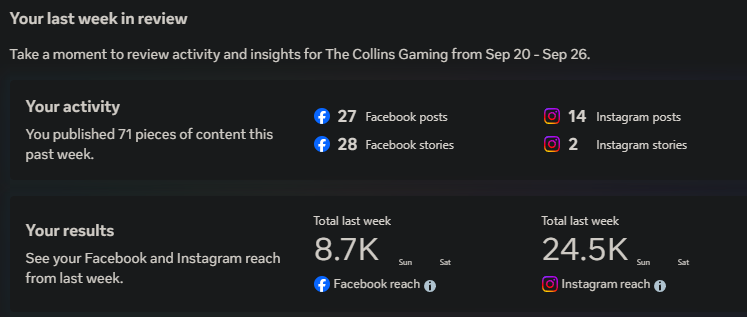
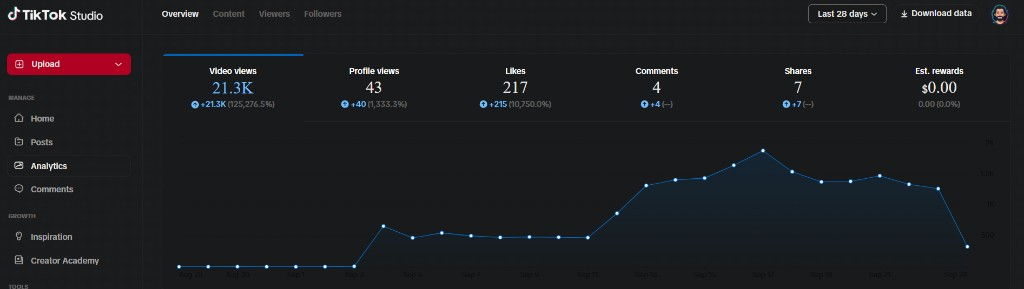
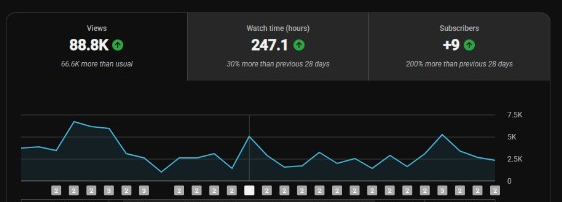
Jack built TCG Machine for his own channel. He went from 1 to 2 posts a week to 6 to 15.
That is his result. It is not a promise for your channel. The recording time didn't change, the editing and posting time did: TCG Machine cuts, captions, and schedules automatically, so 6 to 15 Shorts a week doesn't mean 6 to 15 times the manual editing.
 Opens full size in a new tab.
 Opens full size in a new tab.
 Opens full size in a new tab.
Two ways to fit your setup.
Facecam split: your camera on top, gameplay below. No camera: full gameplay on a blurred background, so nothing gets cropped out. Both export in 9:16 vertical, ready for Shorts and Reels.
Drawn diagrams of the frame shapes. Not screenshots, and not game footage.
Export screen
A slot for an app screenshot. Nothing from a game goes here.
App screenshot
Export screen
Get early access.
TCG Machine is in active development. Join the beta list and you'll be first to know when it opens.